
Download FotoSketcher – Free Photo‑to‑Art Converter, Sketch & Paint Tool
Overview
FotoSketcher is a powerful yet easy‑to‑use Mac application that transforms ordinary photographs into stunning pieces of artwork with a single click. Whether you are a professional photographer looking for quick stylised drafts, a hobbyist who loves experimenting with digital media, or a teacher who wants to create eye‑catching visual aids, FotoSketcher offers a toolbox that feels both familiar and fresh.
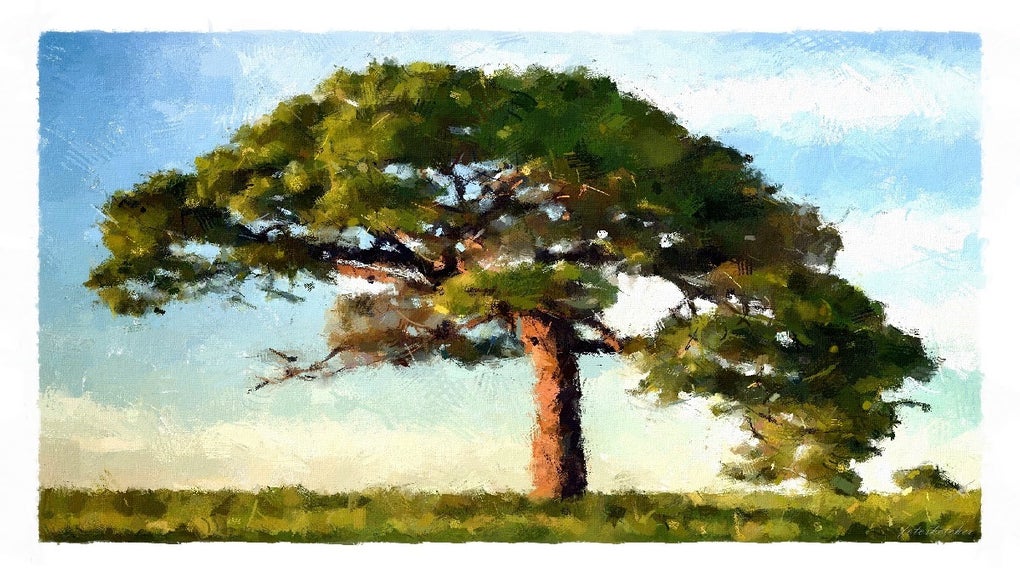
The program’s core strength lies in its intuitive interface. All essential controls are placed front‑and‑center, eliminating the steep learning curve that often accompanies high‑end graphics software. Users can choose from a wide palette of artistic effects—including pencil sketches, watercolor washes, oil‑paint textures, abstract patterns, and even cartoon‑style renderings. Each effect can be applied in a matter of seconds, allowing you to preview multiple looks without committing to a long rendering process.
Beyond the artistic filters, FotoSketcher incorporates a set of image‑enhancement tools that let you fine‑tune contrast, lighting, saturation, and sharpness before or after applying an effect. This two‑step workflow ensures that the final output is not only stylistically appropriate but also technically polished. After processing, the app presents a side‑by‑side comparison of the original photo and the transformed image, making it simple to assess the impact of each adjustment.
Because it is built specifically for macOS, FotoSketcher integrates seamlessly with the system’s native file handling and security protocols. The software is offered as a free download, with no hidden subscription fees, making it an attractive option for budget‑conscious creators. Regular updates are released to add new effects, improve performance, and maintain compatibility with the latest macOS releases.
In short, FotoSketcher combines speed, flexibility, and artistic flair in a single package, positioning itself as a go‑to solution for anyone who wants to turn everyday images into gallery‑worthy creations without investing in expensive, complex software.
Key Features & Capabilities
- Extensive Effect Library: Over 30 built‑in styles ranging from realistic pencil sketches to vibrant watercolor and oil‑paint simulations.
- Real‑Time Preview: Instantly see how each effect will look on your photo, with the ability to toggle between original and edited versions.
- Adjustable Parameters: Fine‑tune brush size, stroke intensity, color saturation, and texture depth for each effect.
- Image Enhancement Tools: Built‑in controls for contrast, brightness, gamma, hue, and saturation to prepare your photo before stylisation.
- Batch Processing: Apply the same effect to multiple images at once, saving time for larger projects.
- High‑Resolution Output: Export results up to 4K resolution without loss of detail, suitable for prints and digital displays.
- Side‑by‑Side Comparison: View original and edited images simultaneously for quick quality checks.
- File Format Support: Import and export JPEG, PNG, TIFF, BMP, and RAW formats.
- Mac‑Optimized Performance: Leveraging Metal API for faster rendering on Apple silicon and Intel Macs alike.
- Free & Secure Download: No hidden fees, no ads, and fully signed by Apple to guarantee safety.
Installation, Usage & Compatibility
Step‑by‑Step Installation
Downloading and installing FotoSketcher on macOS is straightforward. First, visit the official website and click the “Download for macOS” button. The installer is a standard .dmg file. Open the file, drag the FotoSketcher icon into your Applications folder, and launch the app. macOS may prompt you to confirm that you want to open an app from an identified developer; simply click “Open”. The program will then run a short verification routine, after which the main window appears.
Getting Started with a Photo
Once the application is open, you can import an image by clicking the “Open” button or by dragging a file directly onto the workspace. After the photo loads, the left‑hand panel displays the full list of artistic effects. Clicking an effect instantly applies it, and a progress bar appears at the bottom if the rendering takes more than a second. The right‑hand side shows the original image for easy comparison.
For deeper control, click the “Settings” icon next to each effect. Here you can adjust parameters such as stroke thickness, brush texture, colour palette, and level of abstraction. Slider bars provide immediate visual feedback, so you can experiment until you achieve the desired look.
Once satisfied, use the “Export” button to save the final artwork. You can choose the output format, resolution, and destination folder. The app also offers a “Copy to Clipboard” option for quick pasting into other macOS apps.
System Requirements & Operating System Support
FotoSketcher is fully compatible with macOS 10.15 (Catalina) and later, including macOS Ventura and macOS Sonoma. The software runs natively on both Apple Silicon (M1, M2, and later) and Intel‑based Macs, taking advantage of the Metal graphics framework for accelerated processing. Minimum hardware specifications include 4 GB RAM, 200 MB of free disk space, and a GPU that supports Metal. For optimal performance with large, high‑resolution files, 8 GB of RAM or more is recommended.
Because the program is a native Mac application, it integrates with macOS security features such as Gatekeeper and notarization, ensuring that your system remains protected from malicious code. Regular updates are delivered through the built‑in “Check for Updates” feature, which notifies you when a new version is available and handles the download automatically.
Pros and Cons
What Users Love
- Free to download and use with no hidden subscription fees.
- Fast, real‑time rendering of complex artistic effects.
- Extensive library of styles that cater to both beginners and advanced users.
- Intuitive interface that reduces the learning curve.
- High‑resolution export options suitable for printing.
- Batch processing capability saves time on large projects.
- Secure, notarized Mac application that respects system privacy.
Areas for Improvement
- Limited to macOS; Windows and Linux users must look for alternatives.
- Advanced layer‑based editing features found in professional suites are absent.
- No built‑in cloud storage or direct social media sharing integration.
- Occasional lag when processing very large RAW files on older hardware.
- Custom effect creation is not supported, restricting creativity for power users.
Frequently Asked Questions
Is FotoSketcher truly free or are there hidden costs?
FotoSketcher is completely free for personal and commercial use. There are no hidden subscription fees, in‑app purchases, or advertisements. All features described on the website are available in the downloaded version.
Can I use FotoSketcher on a Windows PC?
Currently, FotoSketcher is released only for macOS. Windows users can explore alternative tools such as the Windows version of FotoSketcher (a different project) or other free sketch‑to‑photo converters.
What image formats are supported for import and export?
The application supports JPEG, PNG, TIFF, BMP, and most RAW formats. Export options include JPEG, PNG, and TIFF, with adjustable resolution up to 4K.
How does batch processing work?
Select “Batch Process” from the File menu, add the desired images, choose a single effect (or a preset), configure the parameters, and click “Start”. The program will apply the chosen style to each file sequentially, saving the results in a folder you specify.
Is there a way to revert changes after applying an effect?
Yes. The side‑by‑side view includes a “Reset” button that restores the original image instantly. You can also use the Undo shortcut (⌘ Z) to step back through recent adjustments before exporting.
Conclusion & Call to Action
FotoSketcher stands out as a lightweight, free, and secure solution for macOS users who want to add artistic flair to their photographs without the overhead of professional-grade software. Its extensive effect library, real‑time previews, and straightforward workflow make it ideal for creators of every skill level. While the lack of Windows support and advanced layer editing may limit some power users, the core offering remains robust and reliable.
If you’re ready to transform your images into eye‑catching sketches, watercolors, or oil‑paint masterpieces, simply click the download button below. The installation process takes only a few minutes, and you’ll be creating gallery‑ready artwork in seconds.
Pros: Free, fast rendering, extensive effects, macOS‑optimized.
Cons: macOS‑only, no advanced layering, limited cloud integration.







